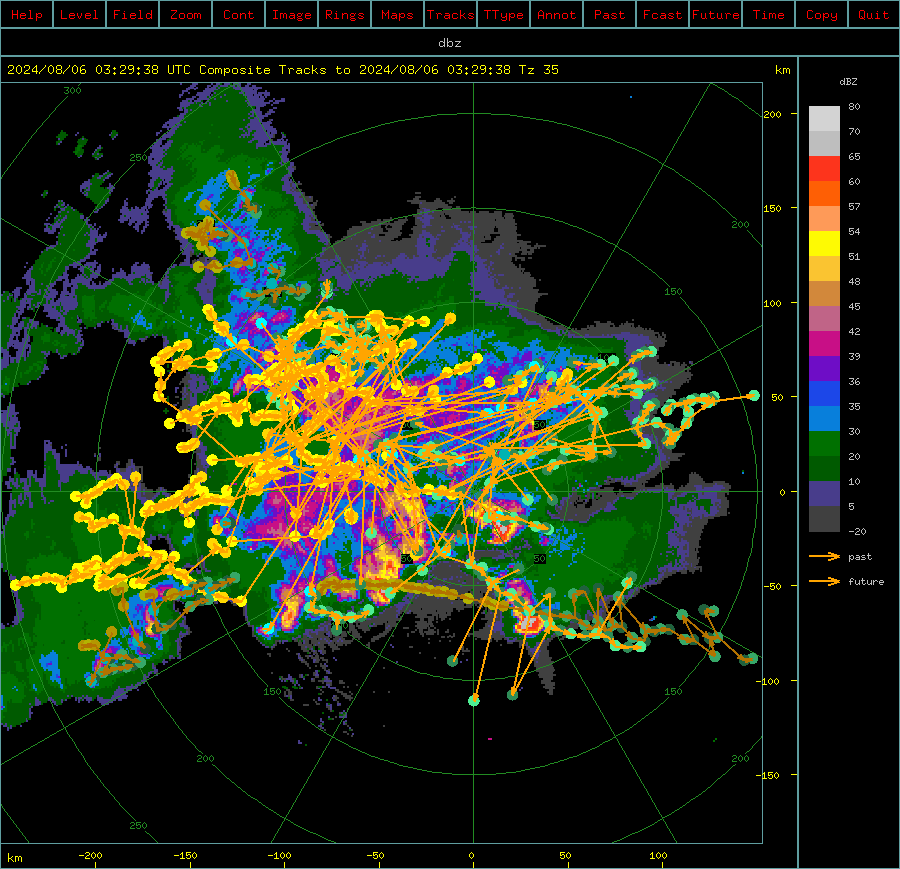
This interactive tutorial takes you through the steps of how to preprocess data in order to run the Thunderstorm Identification, Tracking, Analysis and Nowcasting (Titan) suite. The key preprocessing steps for Titan include: 1) removing noise and non-meteorological echoes (and correcting any biases), and 2) converting from polar to Cartesian grids in the NCAR MDV format. This notebook provides a few examples using LROSE applications, but feel free to use your favorite package to pre-process the data.
Titan was originally designed as an algorithm to objectively identify and track thunderstorms from weather radar data for a weather modification experiment in South Africa in the 1980s. Now, Titan includes forecasting, storm analysis, and climatological analysis. Titan now refers to the larger system in which the original application is one component.
Titan is described in more detail in Dixon and Wiener (1993).
Titan Background
Titan identifies storm objects as a contiguous region of echo that exceeds a user-defined reflectivity threshold and minimum volume. Dual thresholds are used to deal with storm objects that briefly touch, but do not merge. Storm tracking is performed by looking for regions of overlap between storm objects at successive time intervals. Short term storm extrapolation forecasts are used to identify instances of storm merging and splitting. Titan output includes storm tracks, polygons outlining the storm objects, and storm property information (e.g., volume, area, mass, precipitation flux).
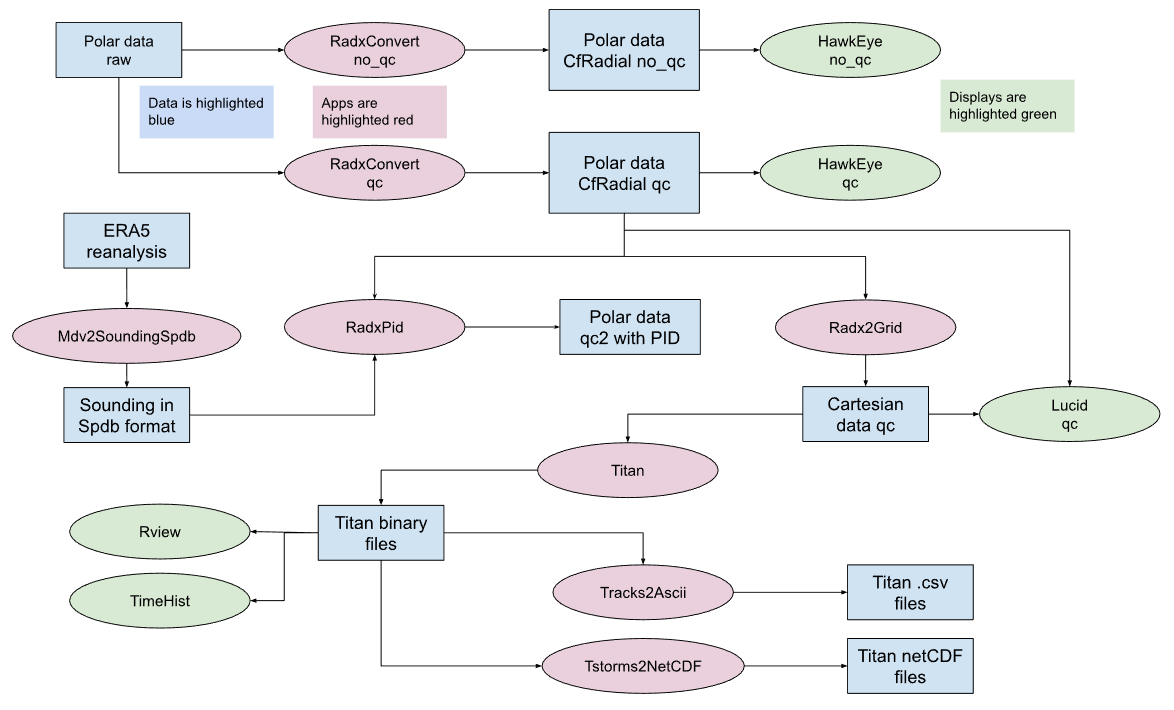
The high-level workflow for Titan is shown in the graphic below. Key steps include quality controlling the data to remove any non-meteorological or compromised echoes and gridding the data to a Cartesian grid. Once Titan is run and the tracks are produced, those data need to be converted into more user-friendly file types.

A more detailed workflow for Titan that includes each step, application, and data type is shown in the graphic below.
Tutorial Overview
1. Setup
Download raw data and prepare parameter files
Raw data files that are provided:
A hail storm in Alberta, observed by the Strathmore radar 40 km east Calgary.
It is a 10 cm (S-band) Gematronik dual polarization radars.
The data (as a .tgz file) has been provided in the form of a zipped tar file, which we will unzip create the following tree:
  ./data/titan/ERA5/20220521
  ./data/titan/radar/raw/derecho/20220521*.h5
2. Output data
After the full analysis has been run, the following derived data directories should exist:
  ./data/titan/ERA5/spdb/KingCity/20220521* (soundings from ERA5)
  ./data/titan/radar/cfradial/qc/KingCity/20220521/cfrad.20220521*nc (cfradial after QC)
  ./data/titan/radar/cart/qc/KingCity/20220521/ncf_202205216*nc (Cartesian MDC CF-compliant netcdf)
3. Note on task cells
This notebook uses two colored cells to indicate tasks.
These text blocks help the user modify the parameter files or other functions in external text files.
These text blocks instruct the users to run a command in a cell within the Jupyter notebook. If you prefer, you are welcome to copy the commands (minus the ! symbol) into a terminal window.
1. Setup
Environment and packages
First, we import the required python packages to run this notebook. Most of the LROSE processing can be done with the os package and shell commands.
import os
import warnings

warnings.filterwarnings("ignore")
1.1 Set up directories
We need to set up the required data directories. The raw radar data will be grabbed from the S3 bucket.
# make overall titan directory and application output directory
!mkdir -p ../data/titan/titan

# make directory for output ascii files from Titan
!mkdir -p ../data/titan/titan/ascii
1.2 Set up the environment
First, we’ll set some key variables we’ll need throughout the workflow.
# Set directory variable to call LROSE
os.environ["LROSE_DIR"] = "/usr/local/lrose/bin"
os.environ["DATA_DIR"] = "../data/titan"
1.3 Get data
Because some of the preprocessing requires ancillary data, we need to grab and untar that data.
import fsspec
import shutil

# Remote endpoint and path
URL = "https://js2.jetstream-cloud.org:8001/"
path = "pythia/radar/ams2025"

# Initialize filesystem
fs = fsspec.filesystem("s3", anon=True, client_kwargs=dict(endpoint_url=URL))

# Get list of files (example: Ontario Derecho)
files = fs.glob(f"{path}/OntarioDerecho2022/2022052115*.h5")

# Local base directory where you want to store files
local_base = "../data/titan/raw/derecho"

for remote_file in files:
    # Construct local file path, preserving the relative directory structure
    rel_path = os.path.relpath(remote_file, start=path)
    local_file = os.path.join(local_base, rel_path)

    # Ensure parent directories exist
    os.makedirs(os.path.dirname(local_file), exist_ok=True)

    # Open remote and local files and copy
    with fs.open(remote_file, "rb") as fsrc, open(local_file, "wb") as fdst:
        shutil.copyfileobj(fsrc, fdst)

    print(f"Downloaded {remote_file} -> {local_file}")
Downloaded pythia/radar/ams2025/OntarioDerecho2022/2022052115_00_ODIMH5_PVOL6S_VOL_CASET.h5 -> ../data/titan/raw/derecho/OntarioDerecho2022/2022052115_00_ODIMH5_PVOL6S_VOL_CASET.h5
Downloaded pythia/radar/ams2025/OntarioDerecho2022/2022052115_00_ODIMH5_PVOL6S_VOL_CASKR.h5 -> ../data/titan/raw/derecho/OntarioDerecho2022/2022052115_00_ODIMH5_PVOL6S_VOL_CASKR.h5
Downloaded pythia/radar/ams2025/OntarioDerecho2022/2022052115_06_ODIMH5_PVOL6S_VOL_CASET.h5 -> ../data/titan/raw/derecho/OntarioDerecho2022/2022052115_06_ODIMH5_PVOL6S_VOL_CASET.h5
Downloaded pythia/radar/ams2025/OntarioDerecho2022/2022052115_06_ODIMH5_PVOL6S_VOL_CASKR.h5 -> ../data/titan/raw/derecho/OntarioDerecho2022/2022052115_06_ODIMH5_PVOL6S_VOL_CASKR.h5
Downloaded pythia/radar/ams2025/OntarioDerecho2022/2022052115_12_ODIMH5_PVOL6S_VOL_CASET.h5 -> ../data/titan/raw/derecho/OntarioDerecho2022/2022052115_12_ODIMH5_PVOL6S_VOL_CASET.h5
Downloaded pythia/radar/ams2025/OntarioDerecho2022/2022052115_12_ODIMH5_PVOL6S_VOL_CASKR.h5 -> ../data/titan/raw/derecho/OntarioDerecho2022/2022052115_12_ODIMH5_PVOL6S_VOL_CASKR.h5
Downloaded pythia/radar/ams2025/OntarioDerecho2022/2022052115_18_ODIMH5_PVOL6S_VOL_CASET.h5 -> ../data/titan/raw/derecho/OntarioDerecho2022/2022052115_18_ODIMH5_PVOL6S_VOL_CASET.h5
Downloaded pythia/radar/ams2025/OntarioDerecho2022/2022052115_18_ODIMH5_PVOL6S_VOL_CASKR.h5 -> ../data/titan/raw/derecho/OntarioDerecho2022/2022052115_18_ODIMH5_PVOL6S_VOL_CASKR.h5
Downloaded pythia/radar/ams2025/OntarioDerecho2022/2022052115_24_ODIMH5_PVOL6S_VOL_CASET.h5 -> ../data/titan/raw/derecho/OntarioDerecho2022/2022052115_24_ODIMH5_PVOL6S_VOL_CASET.h5
Downloaded pythia/radar/ams2025/OntarioDerecho2022/2022052115_24_ODIMH5_PVOL6S_VOL_CASKR.h5 -> ../data/titan/raw/derecho/OntarioDerecho2022/2022052115_24_ODIMH5_PVOL6S_VOL_CASKR.h5
Downloaded pythia/radar/ams2025/OntarioDerecho2022/2022052115_30_ODIMH5_PVOL6S_VOL_CASET.h5 -> ../data/titan/raw/derecho/OntarioDerecho2022/2022052115_30_ODIMH5_PVOL6S_VOL_CASET.h5
Downloaded pythia/radar/ams2025/OntarioDerecho2022/2022052115_30_ODIMH5_PVOL6S_VOL_CASKR.h5 -> ../data/titan/raw/derecho/OntarioDerecho2022/2022052115_30_ODIMH5_PVOL6S_VOL_CASKR.h5
Downloaded pythia/radar/ams2025/OntarioDerecho2022/2022052115_36_ODIMH5_PVOL6S_VOL_CASET.h5 -> ../data/titan/raw/derecho/OntarioDerecho2022/2022052115_36_ODIMH5_PVOL6S_VOL_CASET.h5
Downloaded pythia/radar/ams2025/OntarioDerecho2022/2022052115_36_ODIMH5_PVOL6S_VOL_CASKR.h5 -> ../data/titan/raw/derecho/OntarioDerecho2022/2022052115_36_ODIMH5_PVOL6S_VOL_CASKR.h5
Downloaded pythia/radar/ams2025/OntarioDerecho2022/2022052115_42_ODIMH5_PVOL6S_VOL_CASET.h5 -> ../data/titan/raw/derecho/OntarioDerecho2022/2022052115_42_ODIMH5_PVOL6S_VOL_CASET.h5
Downloaded pythia/radar/ams2025/OntarioDerecho2022/2022052115_42_ODIMH5_PVOL6S_VOL_CASKR.h5 -> ../data/titan/raw/derecho/OntarioDerecho2022/2022052115_42_ODIMH5_PVOL6S_VOL_CASKR.h5
Downloaded pythia/radar/ams2025/OntarioDerecho2022/2022052115_48_ODIMH5_PVOL6S_VOL_CASET.h5 -> ../data/titan/raw/derecho/OntarioDerecho2022/2022052115_48_ODIMH5_PVOL6S_VOL_CASET.h5
Downloaded pythia/radar/ams2025/OntarioDerecho2022/2022052115_48_ODIMH5_PVOL6S_VOL_CASKR.h5 -> ../data/titan/raw/derecho/OntarioDerecho2022/2022052115_48_ODIMH5_PVOL6S_VOL_CASKR.h5
Downloaded pythia/radar/ams2025/OntarioDerecho2022/2022052115_54_ODIMH5_PVOL6S_VOL_CASET.h5 -> ../data/titan/raw/derecho/OntarioDerecho2022/2022052115_54_ODIMH5_PVOL6S_VOL_CASET.h5
Downloaded pythia/radar/ams2025/OntarioDerecho2022/2022052115_54_ODIMH5_PVOL6S_VOL_CASKR.h5 -> ../data/titan/raw/derecho/OntarioDerecho2022/2022052115_54_ODIMH5_PVOL6S_VOL_CASKR.h5
2. Prepare data for analysis
The following sections describe two quality control setups and how to run the scripts.
2.1: Option 1 - Apply quality control (QC) on the raw radar data and convert to CfRadial format using RadxConvert
In the derecho case, considerable interference is present, appearing as radial spikes.
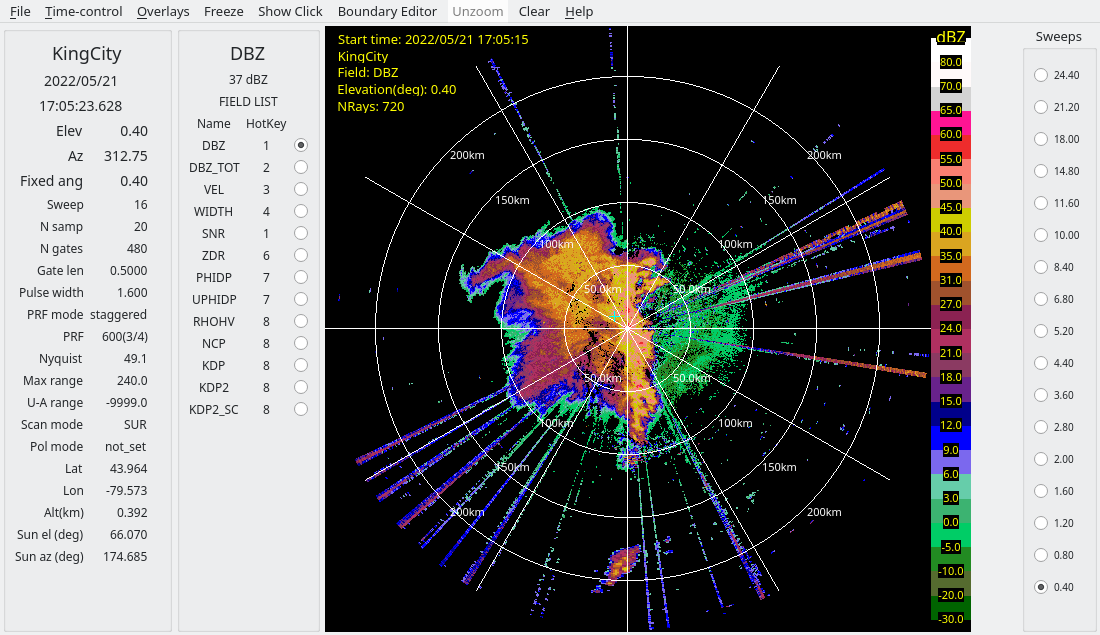
Closer inspection of these spikes shows that the interference sources are not coherent with the radars, as indicated by:
Low SQI (NCP)
Moderately low SNR
To address this, we use RadxConvert to censor data fields based on thresholds applied to the input fields. Specifically, data are removed at gates where both conditions are met:
SQI (NCP) < 0.2
SNR < 25 dB
Since later QC steps require signal-to-noise ratio (SNR), the SNR field is derived from reflectivity (DBZ) and added during processing.
Finally, the raw HDF5 files are converted to CfRadial format using RadxConvert with this simple quality control applied.
Run the derecho case RadxConvert QC script:
!$LROSE_DIR/RadxConvert -sort_rays_by_time -const_ngates -params ../params/titan/RadxConvert.qc.derecho -debug -f ../data/titan/raw/derecho/202205211*CASKR.h5# Run QC on derecho case data
!$LROSE_DIR/RadxConvert -sort_rays_by_time -const_ngates -params ../params/titan/RadxConvert.qc.derecho -f ../data/titan/raw/derecho/OntarioDerecho2022/202205211*CASKR.h5/usr/local/lrose/bin/RadxConvert: /srv/conda/envs/notebook/lib/libcurl.so.4: no version information available (required by /lib/x86_64-linux-gnu/libhdf5_serial.so.103)
======================================================================
Program 'RadxConvert'
Run-time 2026/08/22 07:09:40.
Copyright (c) 1992 - 2026
University Corporation for Atmospheric Research (UCAR)
National Center for Atmospheric Research (NCAR)
Boulder, Colorado, USA.
Redistribution and use in source and binary forms, with
or without modification, are permitted provided that the following
conditions are met:
1) Redistributions of source code must retain the above copyright
notice, this list of conditions and the following disclaimer.
2) Redistributions in binary form must reproduce the above copyright
notice, this list of conditions and the following disclaimer in the
documentation and/or other materials provided with the distribution.
3) Neither the name of UCAR, NCAR nor the names of its contributors, if
any, may be used to endorse or promote products derived from this
software without specific prior written permission.
4) If the software is modified to produce derivative works, such modified
software should be clearly marked, so as not to confuse it with the
version available from UCAR.
======================================================================
Cannot stat file for parsing
../params/titan/RadxConvert.qc.derecho: No such file or directory
ERROR: RadxConvert
Problem with TDRP parameters.
Error: Could not create RadxConvert object.
This simple QC removes some of the bad data, as shown by the screenshots below from the derecho case.
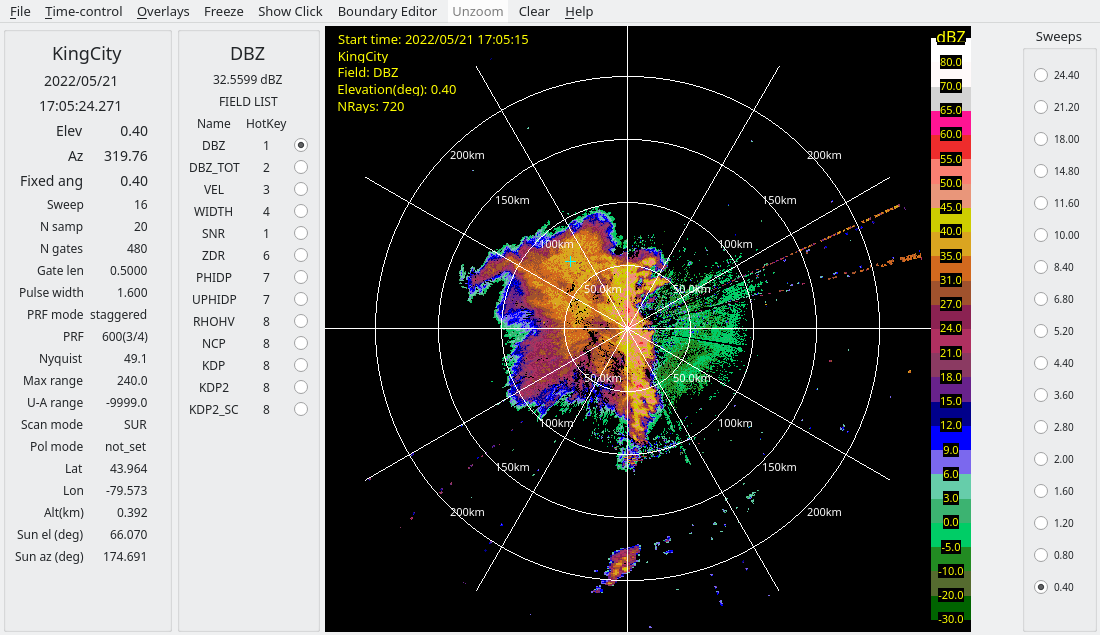
2.2: Option 2 - Computing PID as an alternative method of censoring using RadxPid
An alternative method for cleaning up interference is to run RadxPid, and censor non-meteorological echoes.
First, we have to quality control the data without censoring during the format conversion step.
Run RadxConvert without censoring data:
!$LROSE_DIR/RadxConvert -sort_rays_by_time -const_ngates -params ../params/titan/RadxConvert.no_qc.derecho -f ../data/titan/raw/derecho/OntarioDerecho2022/202205211*CASKR.h5Next, we will use the ERA5 reanalysis to extract model-based soundings:
Run the Mdv2SoundingSpdb to extract the ERA5 sounding:
!$LROSE_DIR/Mdv2SoundingSpdb -debug -params ../params/titan/Mdv2SoundingSpdb.ERA5.derecho -f ../data/titan/ERA5/20220521/20220521_*And we can then run RadxPid:
Run RadxPid to censor non-meteorological data:
!$LROSE_DIR/RadxPid -params ../params/titan/RadxPid.derecho -debugThe following shows the PID field for the derecho case:
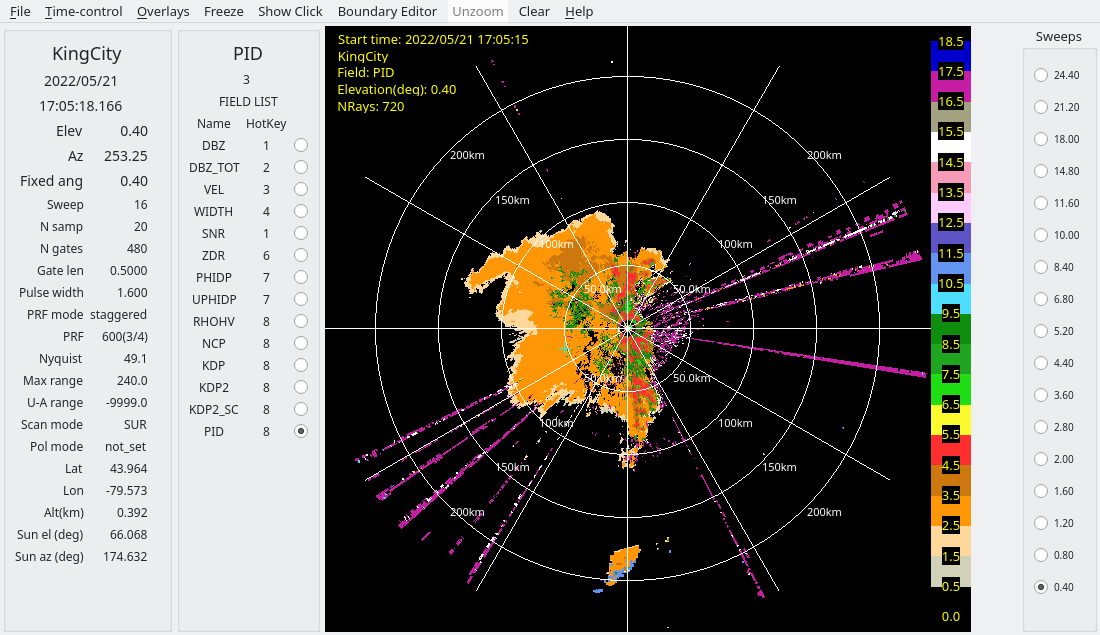
The interference is identified as clutter in this case.
And the following images show the raw data and after using PID to clean up the reflectivity field:
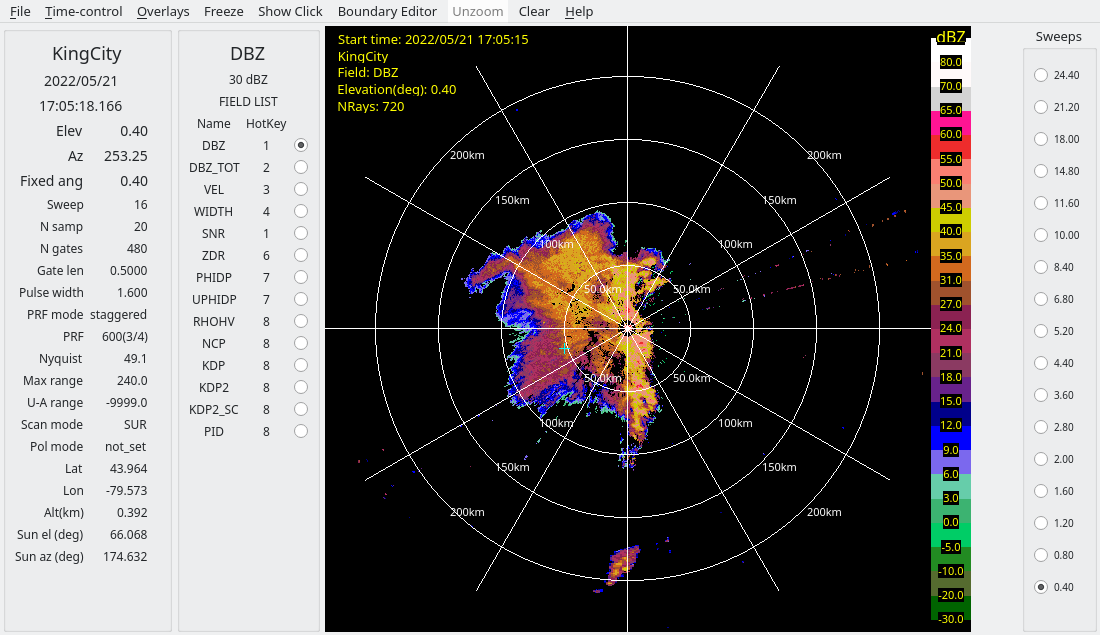
2.3: Convert to Cartesian grid using Radx2Grid
Titan requires input data on a Cartesian grid, instead of the native polar grid. To perform this transformation, we run Radx2Grid to convert the data to Cartesian grid MDV format.
Run Radx2Grid to interpolate the data to a Cartesian grid:
!$LROSE_DIR/Radx2Grid -params ../params/titan/Radx2Grid.derecho3: Now you’re ready to run Titan!
Use the Titan_tutorial notebook to learn more about setting up the parameter file, running Titan, and
- Dixon, M., & Wiener, G. (1993). TITAN: Thunderstorm Identification, Tracking, Analysis, and Nowcasting—A Radar-based Methodology. Journal of Atmospheric and Oceanic Technology, 10(6), 785–797. https://doi.org/10.1175/1520-0426(1993)010<;0785:ttitaa>2.0.co;2